


Assume you just built a high-end car. It has a sleek Italian design, hand-stitched leather seats, and paint that gleams in the showroom. It appears amazing. However, nothing happens when you turn the key. No movement, no roar, no hum. Why? Because you forgot the engine.
In the world of digital marketing, your website’s design and content are the body of that car. They are what the user sees and enjoys. But Technical SEO is the engine. It is the invisible infrastructure that powers everything else. Without it, your lovely website is nothing more than a static billboard hidden in a garage.
While blog topics and keywords are crucial, many business owners completely overlook the technical underpinnings. The hard truth? You can write the best content in the world, but if Google’s bots can’t crawl your site, render your code, or index your pages, you simply do not exist in the search results.
In this deep-dive guide, we are going to look under the hood. We will explore why technical health is the backbone of search visibility and how fixing invisible errors can unlock massive growth for your business.
What is Technical SEO and Why Should You Care?
Website optimizations that speed up the crawling and indexing stages of the search engine workflow are referred to as technical SEO. Technical SEO is unrelated to the content on your page or the people who are discussing you, in contrast to On-Page SEO (content, keywords) and Off-Page SEO (backlinks).

Consider Google to be a strict librarian. The goal of this librarian is to arrange every book (website) on the planet. The librarian will put your book in the “rejected” pile if the pages are glued together, the table of contents is missing, or the text is written in invisible ink.
Technical SEO guarantees that your “book” is flawless. In order for search engine spiders to read your website without encountering obstacles, it entails optimizing the servers, sitemaps, speed, and code of your website. Ignoring this will not only cost you traffic, but it will also actively hinder Google’s ability to perform its duties. Additionally, Google lowers your ranking when you make their job difficult.
The Hierarchy of Needs: It Starts With Crawling.
A complicated process needs to take place before a user can ever click on your website. Known as the “Search Cycle,” it proceeds in the following order: crawling > indexing > ranking.
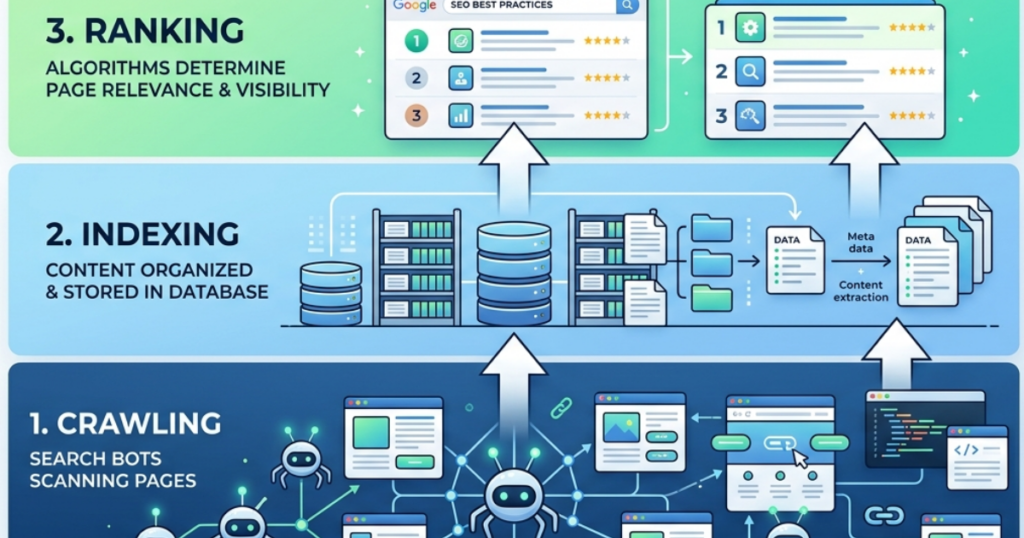
Most people concentrate on the “Ranking” section right away. They aspire to be the best. However, if you haven’t been crawled, you can’t be indexed, and you can’t rank if you haven’t been indexed.
The process of discovery is crawling. To locate fresh and updated content, Google dispatches a group of bots, commonly referred to as spiders or crawlers. These bots follow links to new pages from well-known pages.
We often talk about “Crawl Budget.” This is the number of pages Googlebot crawls on your site on any given day. The bot wastes its budget and departs before discovering your crucial revenue-generating pages if your website is technically clumsy, full of redirect chains, or has slow-loading scripts. Your objective is to make your website so simple to crawl that a Googlebot can finish scanning it efficiently.
Robots.txt: The Gatekeeper of Your Website.
A small text file called robots.txt is the first thing a search bot looks at when it reaches your website. Consider this file to be your digital estate’s gatekeeper. It holds the instructions on where the bots are allowed to go and where they are forbidden.

In an ideal world, you use your robots.txt file to keep bots away from useless parts of your site, like your admin login pages, staging environments, or internal search result pages. This preserves your crawl budget for the high-value content.
But some of the worst SEO catastrophes in history can also be traced back to this file. We’ve seen companies start a redesign and unintentionally leave a “Disallow: /” command in the robots.txt file. This single line of code tells Google, “Go away. Do not look at anything on this entire website.” Overnight, their traffic drops to zero. Ensuring this file is perfectly configured is the first step in any technical audit.
XML Sitemaps: Your Roadmap for Google.
The XML Sitemap is the map you give the visitor if the robots.txt file is the security guard.
A file called an XML sitemap contains a list of all the important URLs on your website. It offers context in addition to listing them. It provides search engines with information about how frequently the page is updated, when it was last updated, and how significant it is in relation to other URLs on the website.

Why is this important for semantic search and NLP (natural language processing)? Because it aids Google in comprehending how your pages relate to one another. If you run a large e-commerce site with 10,000 products, relying on Google to find every product solely through internal links is risky. A sitemap guarantees that the bot has a direct list of everything you offer.
However, a common mistake is bloating your sitemap with garbage. Your sitemap should only contain “indexable” pages you want the public to see. If your sitemap is full of 404 errors, redirects, or low-quality utility pages, you are sending Google on a wild goose chase, confusing its algorithms about the quality of your site.
redirects, or low-quality utility pages, you are sending Google on a wild goose chase, confusing its algorithms about the quality of your site.
Indexing: Getting Your Pages Filed Correctly.
Once a bot has crawled your page, it takes the data back to Google’s servers to analyze it. This is Indexing. If your page makes it into the index, it has the potential to rank.

But technical issues often prevent indexing. The “noindex” tag is the most frequent offender. Search engines are instructed by this HTML code snippet, “You can look at this page, but please do not add it to your search results.” When a website is being tested, developers frequently use this and neglect to remove it once it goes live.
Another indexing barrier is “content bloat.” Google may decide your website is low-value and decide not to index thousands of pages that contain thin, redundant, or automatically generated content. In your Google Search Console reports, this is referred to as “crawled – currently not indexed”.
It’s a courteous way for Google to say, “We saw your page, but we don’t think it’s worth our storage space.” In order to make Google concentrate on your best content, technical SEO entails removing this dead weight.
HTTPS and SSL: The Trust Factor.
Google formally declared HTTPS (Hypertext Transfer Protocol Secure) to be a ranking signal in 2014. Since then, it has evolved into a prerequisite for any reputable company.

You want to see that small padlock icon in the browser bar when you visit a website. This shows that an SSL (Secure Sockets Layer) certificate is present on the website. This encrypts the information that travels from the user’s browser to the server of the website.
Technically speaking, Google Chrome will mark your website as “Not Secure” to users if it is still using HTTP, which is unsecure. This kills conversions. Fearing that their data is in danger, users will leave right away. High bounce rates effectively lower your rankings by telling Google that your website offers a bad user experience. Additionally, in order to avoid losing your current SEO value during the migration, switching from HTTP to HTTPS necessitates precise technical execution (301 redirects).
Site Speed and Core Web Vitals: The Need for Speed
Instant gratification is the norm in our day and age. 53% of visitors to your mobile website will leave if it takes longer than three seconds to load. Speed is a key ranking factor, not merely a luxury.

Google uses a set of metrics known as Core Web Vitals to gauge user experience and speed. In order to pass the technical SEO bar, these are essential:
- Largest Contentful Paint (LCP): How fast does the main content load? (Target: under 2.5 seconds).
- Interaction to Next Paint (INP): How quickly does the site react when you click a button? (Target: under 200 milliseconds).
- Cumulative Layout Shift (CLS): Does the page jump around while loading, causing you to click the wrong thing? (Target: 0.1 or less).
It takes a lot of technical work to improve these metrics, including image compression, CSS and JavaScript file minification, browser caching, and server response time improvements. The goal is to reduce fat so that the code is lean and delivered quickly.
Mobile-First Indexing: Adapting to the Smartphone Era
Google made a significant change to Mobile-First Indexing a few years ago. This indicates that Google primarily indexes and ranks content based on its mobile version. In the past, the “primary” version was the desktop version.

The desktop version is now secondary. Even for desktop searchers, your rankings will drop if your website appears fantastic on a laptop but is slow, broken, or lacking content on an iPhone. Making sure your design is responsive is part of technical SEO for mobile.
The layout of your website should automatically change according to the device’s screen size. Make sure your buttons are clickable (not too close to one another), your font size is readable without zooming in, and there aren’t any large pop-ups that prevent the user from seeing the main content right away. The mobile crawler Google bot Smartphone believes your website is out of date if it has a bad experience.
Site Architecture and URL Structure: Keeping Things Tidy
Imagine going into a grocery store where the milk is in the electronics section and the bread is hidden in the restroom.
The way you arrange your content is called site architecture. A “flat” site architecture is ideal for SEO. This suggests that all of your website’s pages should be reachable from the homepage with just three or four clicks. If a bot needs to click on ten different links to find a blog post, it is unlikely to care.

Here, too, your URL structure is crucial. URLs ought to be readable by humans, clear, and descriptive.
- Bad URL: www.yoursite.com/cat=23/prod_ID?778
- Good URL: www.yoursite.com/services/seo-audit
The “Good” URL utilizes semantic keywords that tell both the user and the NLP algorithms exactly what the page is about before it even loads. A logical hierarchy (Home > Category > Sub-category > Product) creates “silos” of relevance that help search engines understand your expertise in specific topics.
Duplicate Content and Canonical Tags: Avoiding Confusion
Confusion is detested by search engines. Duplicate content is one of the most frequent causes of confusion. This occurs when identical content can be found on several distinct URLs.
For instance, a product on an online store may be available through:
- …/shirts/blue-shirt
- …/sale/blue-shirt
- …/blue-shirt?color=blue
To Google, these look like separate pages competing for the same keywords. This dilutes your ranking power.
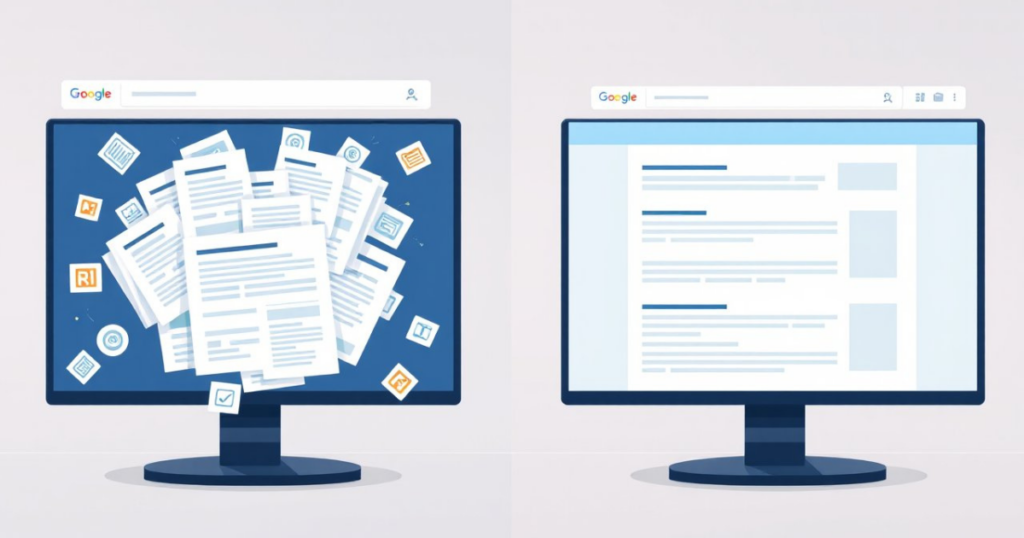
The Canonical Tag (rel=”canonical”) is the technical solution. This code tells Google, “Hey, I know there are duplicate versions of this page, but this specific URL is the original master copy,” and it appears in the header of a page. By properly implementing canonical tags, you can avoid self-cannibalization in search results and strengthen your link equity.
Structured Data and Schema Markup: Speaking Google’s Language
If standard HTML is how we display text to humans, Schema Markup (a form of structured data) is how we explain that text to machines. Schema is a vocabulary of code that lets the search engine decipher the context of your content.
Without Schema, Google sees a number like “4.5” on your page and assumes that it is a number. With schema, you can explicitly tell Google, “This ‘4.5’ is a star rating, out of 5, based on 150 reviews, for a product called ‘SEO Services’.
In its turn, you will improve the click-through rate. These are the effects like star ratings, recipe cooking time, event dates, or FAQ drop-downs you want to achieve directly in Google. Rich Results increase CTR because it makes the listing pop off the screen against competitors.
Fixing Broken Links and Redirect Chains
When a user clicks on a link and receives a “404 Page Not Found” error, nothing irritates them more. It undermines trust and disrupts the user journey. Technically speaking, broken links are your SEO vessel’s leaks. You receive “link juice” (authority) when high-authority websites link to you. That authority is totally lost if the link leads to a 404 page.

Redirect chains are another thing to be cautious of. When Page A reroutes to Page B, which reroutes to Page C, this creates a redirect chain. In order to reach the destination, the bot must hop several times, which slows down loading and wastes crawl budget.
Regular technical maintenance involves:
- Identifying 404 errors and 301 redirecting them to relevant, live pages.
- Fixing redirect chains so that Page A redirects directly to Page C.
- Checking for “Soft 404s” (pages that say they exist but are actually empty).
How to Conduct a Basic Technical SEO Audit
To recognize the warning signs, you don’t have to be a developer. With the tools you probably already have, you can begin a basic health check.
Use Google Search Console (GSC) first. Since Google provides the data, this is the most crucial technical SEO tool. Examine the “Page Indexing” report. The specific reasons why pages aren’t being indexed will be listed (e.g., “Server Error (5xx)” “Redirect Error”, “Blocked by robots.txt”).
Next, view your Core Web Vitals score by running your website through PageSpeed Insights. You will receive a pass/fail rating for both desktop and mobile.
You can use “crawlers” like Screaming Frog SEO Spider for a more thorough investigation. it crawls 500 URLs even with the free version. It will mimic Googlebot and produce a spreadsheet that lists all of your website’s broken links, oversized images, and missing H1 tags.
Frequent auditing, at least once a month, guarantees that minor technical issues don’t escalate into issues that cost businesses money.
Conclusion: Building a Foundation for Future Growth
It is a rarely “important” aspect of digital marketing. Instead of writing creative articles and making viral videos, it needs spreadsheets, code, and server configurations. But it is the most critical one.
Remember the luxury car. You can paint it, polish it and market it to the world but if the engine is missing then you are not going anywhere. With technical SEO as the priority, you are essentially crafting a sturdy, performance-oriented engine for your business. The content can search for its rank on Google when it is eventually generated.
Frequently Asked Questions (FAQs)
What is Technical SEO and why is it important?
Technical SEO refers to optimizing your website’s infrastructure so search engines can easily crawl, index, and rank your pages. It’s important because even the best content won’t rank if search engines can’t properly access or understand your site.
What is included in a Technical SEO checklist?
A complete checklist usually includes:
- Website crawling and indexing checks
- XML sitemap optimization
- robots.txt configuration
- Core Web Vitals improvements
- Mobile-first optimization
- Fixing broken links and redirects
- Canonical tags implementation
How do I perform a Technical SEO audit?
Analyzing your website for issues that affect crawling, indexing, and performance. You can start by:
- Checking Google Search Console for indexing errors
- Running your site on PageSpeed Insights for speed issues
- Using tools like Screaming Frog to find broken links, redirects, and missing tags
Regular audits help catch issues before they impact your rankings.
What is the difference between crawling and indexing in SEO?
When search engines discover your pages by following links. Indexing happens after that—when those pages are stored in Google’s database.If your pages aren’t crawled, they won’t be indexed. And if they’re not indexed, they won’t appear in search results.


